


Idle Racing Tycoon-Car Games
4.62.91K Reviews
App Specs
- Version
- 2.1.6
- Updated On
- License
- Free
- Downloads
- 5,000,000+
- Developer
- Solid Games
- Categories
- Adventure
- Platform
- Android, iOS
Screenshots
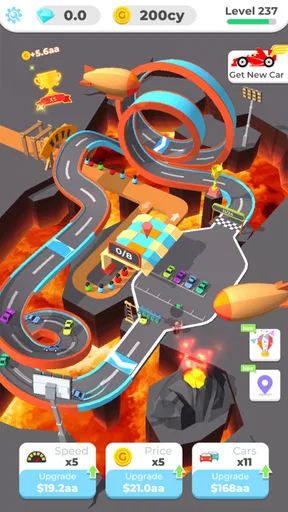
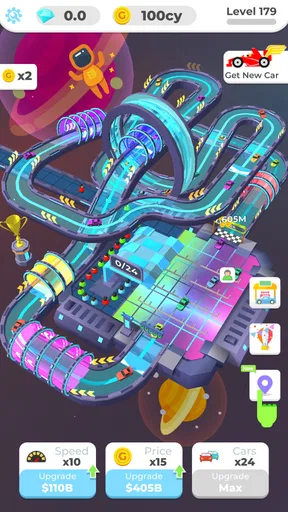
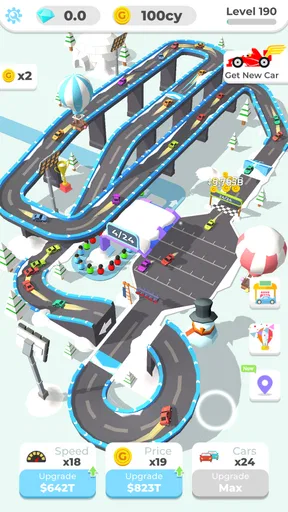

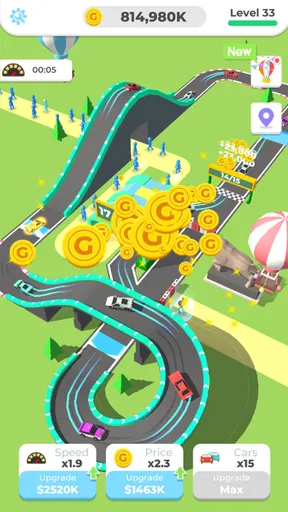
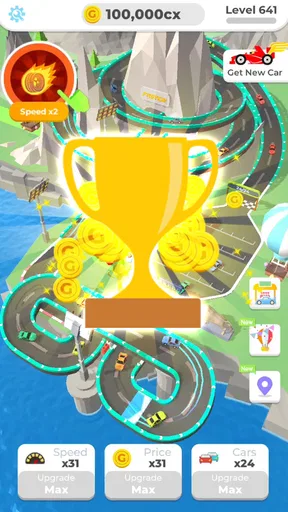
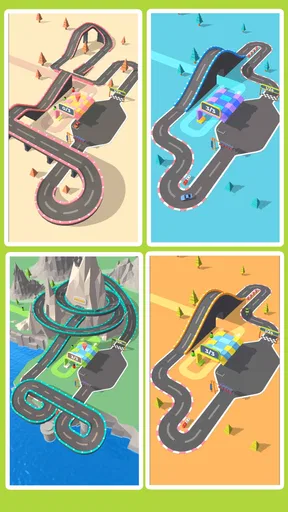

 Analysis by AppCompare
Idle Racing Tycoon-Car Games is the kind of adventure game I open when I want a racing theme without the pressure of steering every corner. Instead of treating each race as a test of reflexes, it places the focus on building and improving a racing circuit. That change in emphasis is important: I spend more time making decisions about progress than trying to master controls.
After spending time with it, I found the appeal easy to understand. The game turns the idea of running a racing venue into a series of small decisions that work well in short sessions. I can check what is happening, make an improvement, leave, and return later. It is free to download, carries an Everyone age rating, and comes from Solid Games, so it is clearly aimed at a broad audience rather than a specialist racing crowd.
The store summary describes the central idea simply: build your racing circuit. In practice, that means the enjoyment comes from watching a modest setup become more capable through repeated upgrades and better timing. The experience is relaxed compared with a traditional racing game, although the word “idle” should not make you expect a completely hands-off experience. The most satisfying progress still comes from checking in and choosing what deserves attention next.
What makes the circuit-building loop work
The strongest part of Idle Racing Tycoon-Car Games is its steady sense of improvement. A conventional racing title usually asks me to concentrate on speed, braking, opponents, and track position. Here, I am thinking more like an operator. I look at the circuit as a project, decide where progress matters most, and return to see whether the previous choice helped.
That structure makes the game approachable for people who enjoy management but do not want a complicated business simulator. It also suits players who like racing presentation but rarely have time for a full competitive session. A few minutes can be enough to make a useful decision, while a longer session gives me room to plan several steps instead of simply repeating races.
There is a subtle trade-off in this design. The game offers less direct excitement than a driving game because I am not personally controlling a car through every turn. If your favorite part of racing is precise handling, close overtakes, or beating your own lap time, this may feel too indirect. Its pleasure comes from progression and planning, not from physical skill.
Where new players can get stuck
The first obstacle is usually not difficulty but expectation. Someone arriving from an arcade racer may look for an immediate race, while this game asks for patience with the development loop. I found it more useful to treat the opening as an orientation period: learn what each available improvement changes, notice how quickly progress accumulates, and avoid assuming that the most visible upgrade is automatically the best one.
Worth Reading Before You Choose

EA SPORTS FC Mobile 26 Is a Bigger Football Game, but It Takes Time

Flipboard Shows What News Apps Must Do Beyond the Feed

Switching to Android Auto Means Rethinking Your Driving Routine

Google Calendar Makes a Crowded Week Easier to Manage

Ludo King Makes the Most of the Minutes Between Plans

Baby Panda World Brings Quick Play to Modern Phones, but Its Game Library Feels Busy
Another common sticking point is deciding what to do during a short visit. When several improvements are available, it is tempting to spend everything at once. I prefer to pause and identify the upgrade that removes the biggest bottleneck. If one part of the circuit is holding back the rest, improving a different area may look productive while producing little practical change.
This is one of the game’s less obvious lessons: idle progress is not the same as automatic progress. Leaving the game alone can help, but the quality of the decisions made before leaving still matters. I get better results when I make one deliberate change, watch how the circuit responds, and only then commit to a larger spending plan.
Players can also become frustrated when progress seems slower than expected. That does not necessarily mean the game is malfunctioning. Management games often make the early improvements feel quick and later decisions more deliberate. Before reinstalling or blaming the device, I check whether I have simply reached a point where the next meaningful improvement requires more waiting or more careful resource use.
Simple setup checks before blaming the game
Because this is a progression-focused game, the first setup check is practical: make sure the installation has finished properly and that the device meets the minimum requirement of Android 6.0. The current version is 2.1.6, so keeping the app updated through the normal store process is sensible when an update is offered. I would also restart the game after an update rather than immediately judging a screen that has not refreshed correctly.
A stable connection is worth checking whenever the game appears slow to respond, especially around store activity or account-related behavior. I do not treat a delayed screen as proof that progress has disappeared. First, I wait briefly, move to another in-game screen if possible, and reopen the app normally. Closing and reopening is a safer first step than clearing storage, because clearing local data can create avoidable problems in any progression game.
Storage space on the phone is another easy detail to overlook. A device that is nearly full can behave unpredictably when installing updates or writing new local information. I check available space, close other demanding apps, and then launch the game again. These are ordinary steps, but they prevent a lot of confusion before more drastic troubleshooting begins.
Since the game is free to download but includes optional purchases priced from $3.99 to $18.99 per item, I would also review purchase settings before handing the phone to a child. The Everyone rating makes it suitable for a wide audience, but an age rating is not the same thing as permission to spend. In my view, checking the device’s purchase controls is part of responsible setup, particularly for a family tablet.
A better short-session workflow
My preferred routine is to open the game with one question in mind: what is currently limiting the circuit? I check the available progress, choose the improvement that addresses that limitation, and avoid scattering resources across unrelated choices. This keeps a five-minute visit useful instead of turning it into random tapping.
For a longer session, I use a simple three-step rhythm. First, I observe the current state without spending. Second, I make the upgrade that appears to have the clearest effect. Third, I leave enough room to evaluate the result before making another commitment. This approach is less exciting than buying everything immediately, but it gives me a better sense of cause and effect.
One practical use case is a commute or lunch break. I can open the game, make a focused adjustment, and close it without needing the uninterrupted attention demanded by a conventional race. Another is winding down in the evening. The circuit-building theme provides a small sense of progress without requiring fast reactions or a long campaign session.
I would not recommend opening it while expecting a complete idle experience that plays itself. The game works best when I treat idle time as support for my decisions, not as a replacement for them. If I leave after making a poor upgrade choice, the waiting period does not magically make the strategy better.
Recovering when progress or screens seem wrong
If a reward or improvement does not appear immediately, I first give the game a moment and check the relevant screen again. I avoid repeatedly tapping purchase or upgrade controls, because a delayed response can make it difficult to tell whether an action was accepted once or several times. Patience is particularly useful when the device is busy or the connection is unstable.
If the interface still looks incorrect, I close the app through the normal system controls and reopen it. Before doing anything destructive, I make sure I know how the game is currently preserving progress on my device. I would not clear app data or uninstall as a casual experiment, because those steps can remove local information and may leave me with a more serious recovery problem.
For an in-app purchase that appears incomplete, I would avoid buying the same item again immediately. I would first confirm that the transaction has finished through the device’s usual purchase history, then restart the game and check the relevant area again. If the problem remains, the sensible next step is to use the official support route associated with the app store and keep the transaction details available.
The same careful approach applies after an update. A new version can change how a screen loads or how quickly information appears, but that does not automatically mean the circuit has been reset. I close and relaunch once, verify the visible progress, and only then consider further action. This workflow is slower than reinstalling, but it protects the progress I care about.
When the app is not the real cause
Some apparent problems are really device or network issues. If other apps are also slow, the phone may be low on space, overloaded, or struggling with a weak connection. If only this game behaves strangely after an update, then restarting it and checking for another available update is more reasonable than changing several phone settings at once.
Battery-saving modes can also affect how apps behave in the background. I do not assume that every pause means the game has failed; sometimes the operating system is limiting background activity to preserve power. For reliable check-ins, I open the game directly rather than expecting every part of the experience to continue while it is closed.
There is also a difference between a design limitation and a technical fault. If progress feels gradual, that may be the intended management pacing. If a button refuses to respond, a screen remains blank, or a completed action repeatedly fails to appear after a restart, that is more likely to deserve troubleshooting. Separating those cases helps prevent unnecessary resets and unrealistic expectations.
How it compares with ordinary racing games
Compared with an arcade racer, this game is easier to fit around an unpredictable schedule. I do not need a quiet block of time to finish a race or maintain concentration through a difficult course. The trade-off is that I lose the tactile satisfaction of steering and the immediate feedback of winning a close contest.
Compared with a deep tycoon simulator, it is more approachable and less intimidating. I can understand the main idea without learning a large set of business systems first. However, players who want detailed financial modeling, complex staff management, or a highly realistic motorsport operation may find the circuit-building layer too light.
That middle position is exactly why I think it works for casual players. It borrows the atmosphere of racing, adds the satisfaction of management, and keeps the interaction simple enough for short visits. It is not a substitute for a serious driving game, and it should not be judged by the same standard.
Who should play and who should skip it
I would recommend it to someone who likes watching a small project grow, enjoys making upgrade choices, and wants a racing-themed game that does not depend on quick reflexes. It is also a reasonable choice for families looking for an Everyone-rated title, provided purchase controls are configured responsibly.
I would suggest skipping it if you need constant action, direct car control, or a clearly defined competitive finish in every session. Players who dislike waiting for progress or making repeated improvement decisions may find the loop repetitive. The same is true for anyone who wants a realistic racing simulation rather than a casual tycoon interpretation of the sport.
The audience that benefits most is the player who enjoys returning to a project. The game rewards attention spread across many small visits more than one intense sitting. That makes it a good companion for spare moments, but a weaker choice if you only play games when you have enough time for a substantial challenge.
My practical verdict
Idle Racing Tycoon-Car Games is a pleasant free adventure game built around gradual circuit development rather than hands-on racing. Solid Games has chosen a simple idea that is easy to understand, and the broad reception is encouraging: it holds a 4.6 average from around 75 thousand ratings, with more than five million installs. Those figures do not replace personal taste, but they match my impression that the game has found a comfortable audience.
Its best quality is the way it turns a racing setting into a calm decision-making routine. I can check the circuit, identify the most useful next step, and leave with a sense that my visit mattered. The main limitations are equally clear: progress can feel slow, direct racing action is limited, and players must be careful not to confuse idle waiting with strategic play.
The game is free, although optional purchases range from $3.99 to $18.99 for an item, so I would set spending boundaries before playing on a shared device. With Android 6.0 or later, a little patience during updates, and sensible recovery habits, the setup is straightforward. My recommendation is simple: choose it for relaxed circuit management, not for high-speed driving.
After using it, I would recommend giving it a try if the idea of building a racing venue sounds more appealing than controlling every race. Start slowly, improve the part of the circuit that is holding you back, and judge the game over several short sessions rather than one impatient opening. For the right player, that gradual rhythm is the whole point; for everyone else, a conventional racer will provide more immediate excitement.
Pros
- Simple idle mechanics make progress easy to understand.
- Races continue earning rewards while you are away.
- Many cars and upgrades provide long-term collection goals.
- Short sessions work well for quick mobile gaming.
- Bright visuals and accessible controls suit casual players.
Cons
- Progress can feel repetitive after mastering the early upgrades.
- Premium currency may be limited without watching ads or waiting.
- Later improvements often require lengthy offline earnings.
- The racing gameplay offers little direct player control.
- Frequent ad prompts may interrupt the overall experience.
FAQs for Idle Racing Tycoon-Car Games
What is Idle Racing Tycoon–Car Games?
Idle Racing Tycoon–Car Games is a casual management game that combines automated racing with tycoon-style progression. You build and improve your racing business, unlock new vehicles or tracks, and earn rewards even when you are not actively playing. The main appeal is its relaxed gameplay: instead of controlling every turn, you focus on upgrades, income, staff, and long-term expansion.
How do you progress in Idle Racing Tycoon–Car Games?
Progress is based mainly on investing your earnings wisely. You can usually upgrade cars, racing facilities, drivers, and other business elements to increase speed and income. As your operation becomes more efficient, you unlock additional content and more profitable events. Returning regularly to collect idle rewards and prioritizing upgrades that improve earnings can make advancement noticeably faster.
Can Idle Racing Tycoon–Car Games be played offline?
The game may allow some idle progression and basic management while offline, but certain features can require an internet connection. Online access is commonly needed for advertisements, cloud synchronization, special events, updates, and in-app purchase verification. If you plan to play without a connection, it is best to test which rewards and systems remain available offline on your specific Android or iOS device.
Is Idle Racing Tycoon–Car Games free to download and play?
Idle Racing Tycoon–Car Games is generally available as a free download, allowing you to begin building your racing empire without paying upfront. However, free-to-play systems may include optional purchases for currency, boosts, ad removal, or faster progress. Advertisements can also appear during gameplay. You can normally enjoy the core experience without spending money, although progression may take longer.
Is Idle Racing Tycoon–Car Games suitable for children?
The game is easy to understand and does not require advanced racing skills, making it accessible to younger players and casual audiences. Nevertheless, parents should check the age rating, advertising content, privacy information, and available in-app purchases before installation. Because idle games encourage frequent returns and may offer paid shortcuts, parental controls are recommended if children will be playing.


